Plans and limits
What the Free and Pro plans include, what counts toward the Free limits, and what happens when you reach them.
PromptMason has two plans, Free and Pro. Both include every feature. The only difference is how many blocks and prompts you can keep. For prices, see Pricing.
Free and Pro
| Free | Pro | |
|---|---|---|
| Features | Every feature | Every feature |
| Blocks | Up to 25 | No limit |
| Prompts | Up to 15 | No limit |
Pro is for one person, on up to 3 of their own computers.
Team libraries, sync, backups, AI assist, Chat, connected apps and the Chrome extension all work on Free. So does the local model, PromptMason’s own AI model that runs on your PC. It costs nothing extra on any plan.
Every download starts with 14 days of Pro, with no key. When the 14 days end, PromptMason moves to Free unless you activate a Pro key. The 14 days are a trial of Pro, not a third plan. A key is only for people who buy Pro. See Your trial and license key for how the trial and keys work.
What counts toward the Free limits
- Every library on this PC. Your personal library and every team library on this PC count together, whether you created the team library or joined it.
- Archived items count. Archiving a block or prompt doesn’t free a place.
- Items in Recently deleted don’t count. Deleting a block or prompt frees its place straight away. Restoring it from Recently deleted is checked like making a new one. See Archive, delete and restore.
- Embedded blocks don’t count. A block that lives inside one prompt only isn’t a library block. See Library blocks and embedded blocks.
- Markdown documents count as prompts. They share the same 15. See Markdown documents and Skills.
- Chats, variables, folders and comments don’t count.
See how much you use
On the Free plan:
- The Blocks screen shows “n of 25 blocks” at the top, next to New block.
- The Prompts screen shows “n of 15 prompts” at the top.
- Click Settings in the sidebar, then Plan. Under Your plan you see Blocks and Prompts, each with how many of the limit you use.
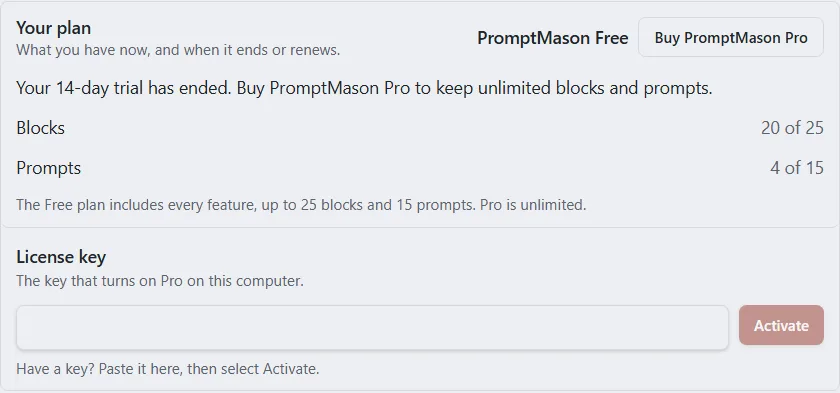
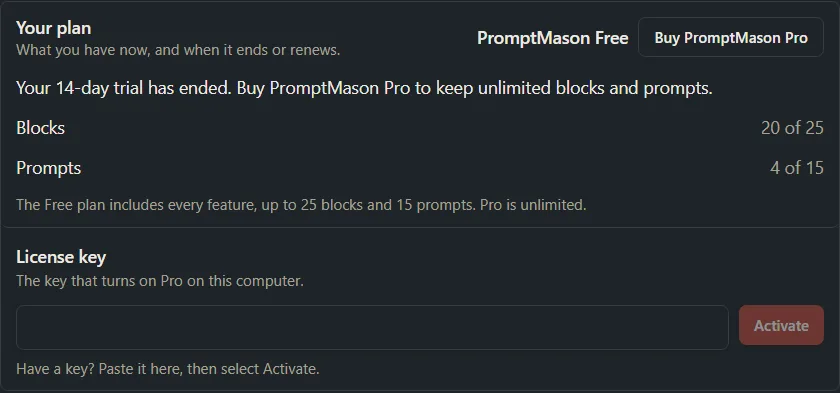
On Pro, the counters don’t show, because there’s no limit.
When you reach a limit
PromptMason checks before it opens a new block or prompt, not after you’ve written it. If adding one more would go over the limit, the Free plan limit window opens instead of the form. It says how many you have, and that archived items count.
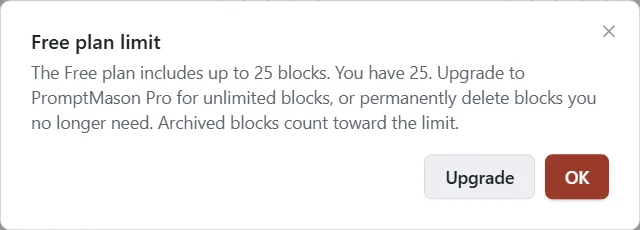
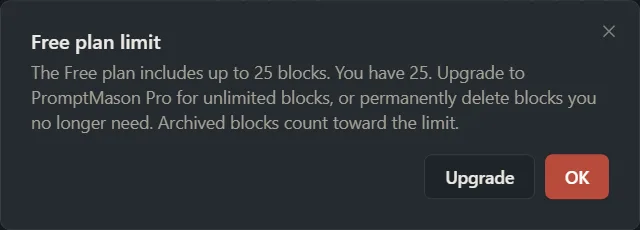
The same check runs before you copy, duplicate or import. A copy of several items or a whole folder either fits completely or doesn’t happen at all. If it doesn’t, the window says how many it would add and how much room you have left.
In the window:
- Upgrade opens the checkout in your browser, where you can buy Pro.
- OK closes the window. Nothing was created.
To make room without buying Pro, delete blocks or prompts you no longer need. Deleted items go to Recently deleted, which doesn’t count. The window says to permanently delete items, but moving them to Recently deleted is enough; you don’t need to empty it. Archiving doesn’t help, because archived items count.
If you’re over the limits
Being exactly at a limit (25 blocks, or 15 prompts) is fine. You can end up with more than the Free limits in these ways:
-
Your 14 days of Pro or your Pro license end, you remove it from the PC, or PromptMason couldn’t check it for 14 days, and you have more than the Free limits. For example, your 14 days of Pro are over and you have 40 prompts.
-
On the Free plan, you join a team library, or teammates or your other PCs add items to a library you share. Those items count too, and they aren’t stopped at the limit.
-
On the Free plan, you choose Add anyway for a block pack bigger than the Free plan. PromptMason asks first (Add a block pack).
Your library is then paused: you can see, search and export everything, but you can’t add, edit or copy until you’re within the limits again or you activate Pro. Nothing is deleted. See When your library is paused.
Team libraries on Free
Team libraries work on Free, but their blocks and prompts count toward your limits on every PC that holds them, together with your personal library. When you join a team library on the Free plan, the Join a team library window reminds you of this and shows how many blocks and prompts you have now. If joining takes you over 25 blocks or 15 prompts, your library is paused until you’re back within the limits or on Pro. See When your library is paused and Team libraries.
Want a hand?
Copy this prompt into Claude, ChatGPT or another AI assistant, and it walks you through it step by step.
I'm on the PromptMason Free plan and keep hitting the limit. Explain what counts toward the 25 blocks and 15 prompts, how to see how many I've used, and what my options are.
Copy adds a short note about PromptMason and this guide's steps, so the assistant has what it needs.
I'm on the PromptMason Free plan and keep hitting the limit. Explain what counts toward the 25 blocks and 15 prompts, how to see how many I've used, and what my options are. About PromptMason: a Windows desktop app for building AI prompts from reusable blocks. A person writes blocks (reusable pieces of prompt text), builds prompts from them on the Build screen (or keeps a Markdown document, such as a Skill), and copies a prompt into an AI tool, runs it in PromptMason’s own Chat, or lets a connected AI agent use it through PromptMason’s built-in MCP server (the Chrome extension copies prompts on any website). AI assist, Evaluate and Chat use a local model that runs on the person’s PC, or their own AI provider. The guides are also on PromptMason’s Help screen, and Chat can answer “how do I” questions from them. Libraries hold the blocks and prompts; a person can sync their personal library to their other PCs and share team libraries, both through a folder in cloud storage they already have (OneDrive, Google Drive or Dropbox). Everything synced is encrypted and every edit is signed and checked. A recovery kit (a file plus a code) is the spare copy of the person’s keys, for when every PC is lost. The official guide for this is "Plans and limits": https://promptmason.ai/docs/plans Its full text follows, between the lines. Use it as the source of truth, and if anything I see differs from it, tell me rather than guessing. --- PromptMason has two plans, Free and Pro. Both include every feature. The only difference is how many blocks and prompts you can keep. For prices, see [Pricing](https://promptmason.ai/pricing). ## Free and Pro | | Free | Pro | |---|---|---| | Features | Every feature | Every feature | | Blocks | Up to 25 | No limit | | Prompts | Up to 15 | No limit | Pro is for one person, on up to 3 of their own computers. Team libraries, sync, backups, AI assist, Chat, connected apps and the Chrome extension all work on Free. So does the local model, PromptMason's own AI model that runs on your PC. It costs nothing extra on any plan. Every download starts with 14 days of Pro, with no key. When the 14 days end, PromptMason moves to Free unless you activate a Pro key. The 14 days are a trial of Pro, not a third plan. A key is only for people who buy Pro. See [Your trial and license key](https://promptmason.ai/docs/license) for how the trial and keys work. ## What counts toward the Free limits - **Every library on this PC.** Your personal library and every team library on this PC count together, whether you created the team library or joined it. - **Archived items count.** Archiving a block or prompt doesn't free a place. - **Items in Recently deleted don't count.** Deleting a block or prompt frees its place straight away. Restoring it from **Recently deleted** is checked like making a new one. See [Archive, delete and restore](https://promptmason.ai/docs/archive-and-delete). - **Embedded blocks don't count.** A block that lives inside one prompt only isn't a library block. See [Library blocks and embedded blocks](https://promptmason.ai/docs/embedded-blocks). - **Markdown documents count as prompts.** They share the same 15. See [Markdown documents and Skills](https://promptmason.ai/docs/markdown-documents). - **Chats, variables, folders and comments don't count.** ## See how much you use On the Free plan: - The **Blocks** screen shows "*n* of 25 blocks" at the top, next to **New block**. - The **Prompts** screen shows "*n* of 15 prompts" at the top. - Click **Settings** in the sidebar, then **Plan**. Under **Your plan** you see **Blocks** and **Prompts**, each with how many of the limit you use. On Pro, the counters don't show, because there's no limit. ## When you reach a limit PromptMason checks before it opens a new block or prompt, not after you've written it. If adding one more would go over the limit, the **Free plan limit** window opens instead of the form. It says how many you have, and that archived items count. The same check runs before you copy, duplicate or import. A copy of several items or a whole folder either fits completely or doesn't happen at all. If it doesn't, the window says how many it would add and how much room you have left. In the window: - **Upgrade** opens the checkout in your browser, where you can buy Pro. - **OK** closes the window. Nothing was created. To make room without buying Pro, delete blocks or prompts you no longer need. Deleted items go to **Recently deleted**, which doesn't count. The window says to permanently delete items, but moving them to **Recently deleted** is enough; you don't need to empty it. Archiving doesn't help, because archived items count. ## If you're over the limits Being exactly at a limit (25 blocks, or 15 prompts) is fine. You can end up with more than the Free limits in these ways: - Your 14 days of Pro or your Pro license end, you remove it from the PC, or PromptMason couldn't check it for 14 days, and you have more than the Free limits. For example, your 14 days of Pro are over and you have 40 prompts. - On the Free plan, you join a team library, or teammates or your other PCs add items to a library you share. Those items count too, and they aren't stopped at the limit. - On the Free plan, you choose **Add anyway** for a block pack bigger than the Free plan. PromptMason asks first ([Add a block pack](https://promptmason.ai/docs/block-packs#on-the-free-plan)). Your library is then paused: you can see, search and export everything, but you can't add, edit or copy until you're within the limits again or you activate Pro. Nothing is deleted. See [When your library is paused](https://promptmason.ai/docs/paused-library). ## Team libraries on Free Team libraries work on Free, but their blocks and prompts count toward your limits on every PC that holds them, together with your personal library. When you join a team library on the Free plan, the **Join a team library** window reminds you of this and shows how many blocks and prompts you have now. If joining takes you over 25 blocks or 15 prompts, your library is paused until you're back within the limits or on Pro. See [When your library is paused](https://promptmason.ai/docs/paused-library) and [Team libraries](https://promptmason.ai/docs/team-libraries). --- How to help me: - Go one step at a time. After each step, ask what I see on screen before giving the next one. - Use the exact words on PromptMason’s buttons and screens, as the guide does. - Never ask me for my recovery code, my recovery kit file, a password or my invite line, and never ask me to paste them here. - Start by asking which step I’m on, or what I see now.